← trycognate.com

Let's take a deep dive
into how Cognate works.

Frankly, it can be hard to describe Cognate — or to understand its real power — until you understand everything it does. But it is more than a collection of features. The key is that it is all one thing. Nothing is bolted together.

So don't think of this as a feature list. Think of it as looking at each of the threads that weave together into the fabric of your life. That is the true power of Cognate.

We also don't want any surprises. So this goes through every part of Cognate as it stands today, what each one is for, and — at the end — what is not here yet.

01 · The loom

This isn't our fabric. It's a loom to weave your own.

Start here, because everything after it rests on this. Cognate is not a set of screens we designed for an imagined user. It is an object model, and you can reshape it. As you do, you’ll find that the product bends to the shape of your life instead of the other way round. And you don’t need to do it all — just tell Ari what you’re trying to weave together and let her build it for you.

Everything is the same kind of thing

A person, an organization, a project, a task, a document, a place, a website you keep — each is a record with a type, a set of fields, notes written in the block editor, a log of what has happened to it, and links to everything else. There is no special case. The machinery that files an email against a project is the machinery that files a wine against a region, if a region is a thing you keep.

Three kinds of type

Some are always on, because Cognate's own workflows make and rely on them: People, Organizations, Projects, Tasks, Follow-ups, Events, Places, Daily Notes, the Library and its Notes, and Priorities. Some ship switchable — Situations and Areas on by default, Deals and Key Results off until you want them. And some you invent, with whatever fields you like.

What you can change on any type

Its fields, including ones an import brought in that Cognate lists for you to adopt or hide. Whether it can hold other items, or sit inside one. Whether it keeps a log, and whether a container gathers the logs of everything beneath it. Which four fields show on a row in a list. What a new one starts with, as a template. Which hat it belongs to by default. How its list opens — as a list, a browse wall of tiles, or a calendar. And whether its items hold time on your other calendars, so entering a trip once marks those days busy everywhere.

Fields that point at other records

A Lookup field holds a link to another record — People by default, or any type you choose, or anything at all, one or several. That is how a Project gets a Sponsor, a Deal gets a Competing with, and a type you invented last week gets a field pointing at a type you invented yesterday. The links behave like every other link in Cognate: they show on both ends, they filter, they search, and Ari can read them.

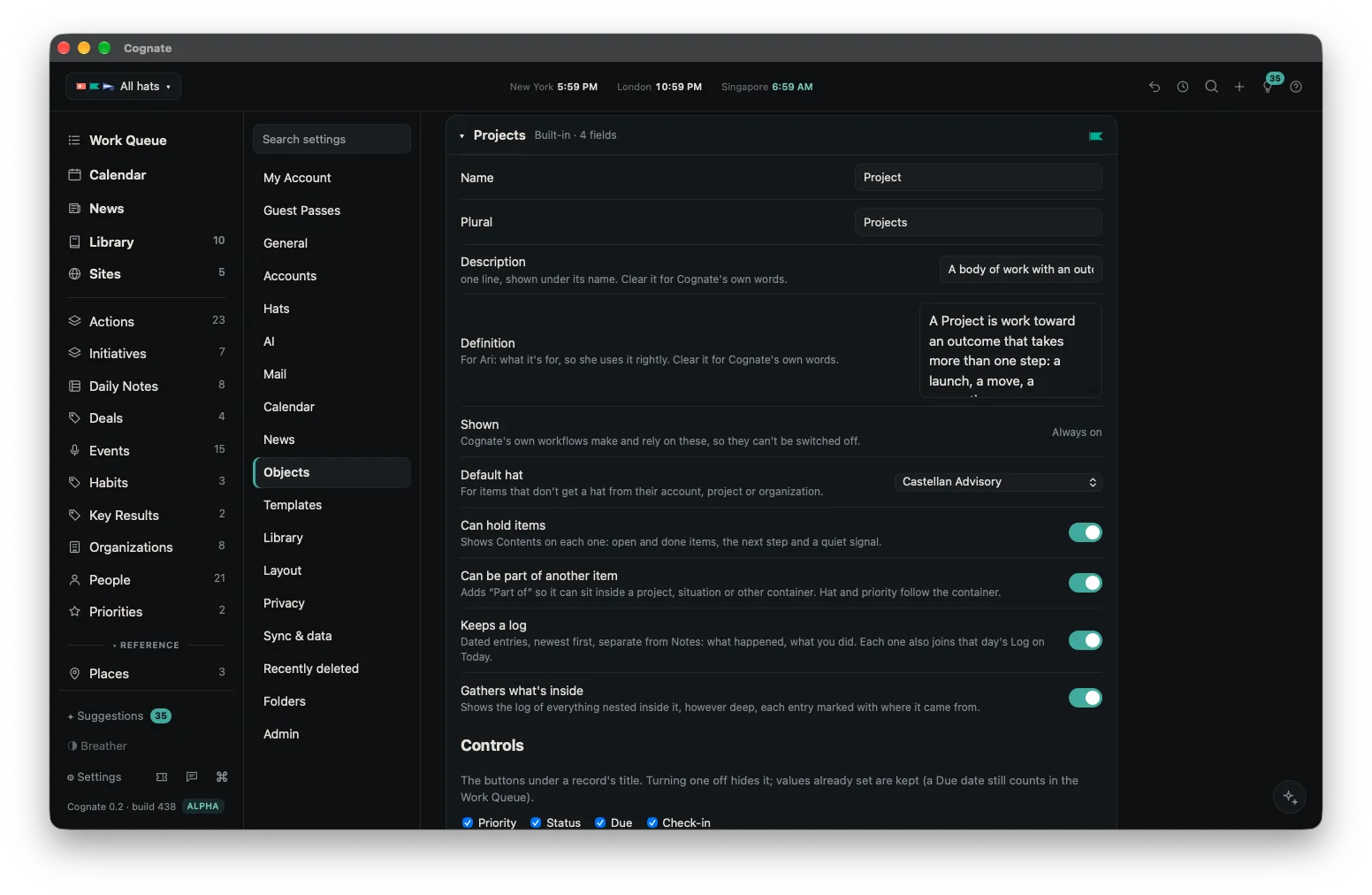
Cognate’s Objects settings with a type open, listing its fields and the switches that decide whether it can hold other items, whether it keeps a log, and how its list opens.
Settings → Objects. A type, its fields, and the switches underneath it. This is the loom.

None of this is required to use Cognate. Out of the box it is a complete product. The loom is there for the day you want something it does not ship with.
02 · Hats

Hats go deeper than they look.

You have met hats already. What is harder to show on a home page is how far down they go. A hat is not a tag or a color you stick on afterwards. Nearly every setting in Cognate has a per-hat version, and every single record in it wears one — including the ones Cognate makes on its own, which inherit the hat of whatever produced them.

Each hat sets its own bar for what reaches you

A hat decides what gets into Focus: everyone who matters to it, only people you already track, or nothing at all. So the board you sit on can be quiet by default while the day job is not, without you writing a single rule. A hat can also be marked confidential, and then nothing in it is sent to a model, by any feature.

Burgees

Each hat flies one — a shape and a color, borrowed from the little flags a boat flies to say who she belongs to. You will learn them in a day, and after that you read a mixed list the way you read a harbor: by the flags, without stopping to think.

One, a few, or all of them at once

Work inside a single hat and the rest of your life disappears. Put two or three together and you get the view that matters most of the time: the client and the day job, say, without the family and the board in the way. Or stand above them all and catch the Thursday where three collide, which is the view nobody else can give you, because nobody else has all three.

Hats teach the AI who you are

Where you live and how you write stay the same across hats. Your role, your organization, what you are focused on, who you compete with and whose writing you follow are set per hat. Each AI request carries the profile of the hat it concerns; a request that spans hats carries all of them, each labeled. The news scorer, mail triage and Ari all work from the same profile rather than each guessing separately.

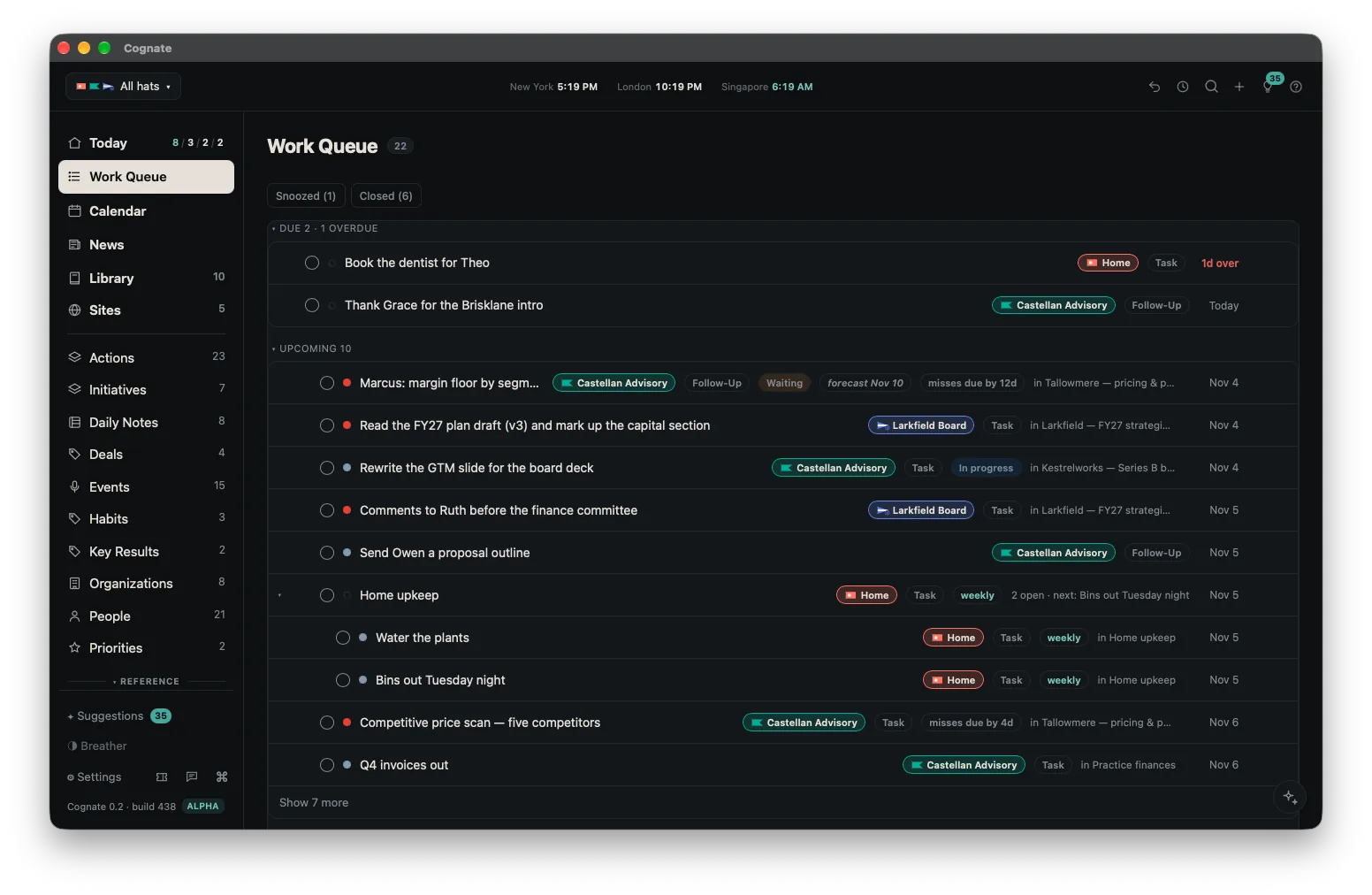
Cognate's Work Queue: commitments from every part of a life in one list, each row flying the burgee of the hat it belongs to and naming the project or thread it came from.
One list, several hats. After a day of it you read the burgees before you read the words.

04 · Mail

Mail, sorted by what it is actually about.

Nothing migrates. Cognate signs in to Microsoft 365, Google Workspace, iCloud, or plain IMAP and CalDAV, several at once, and reads and writes straight to them. Archive here and it is archived there. What changes is everything above that.

Four lanes, and what decides them

The four lanes are the same everywhere. What changes is the bar: each hat sets who clears it, which is how a quiet hat and a loud one share one inbox without either drowning the other.

Focus is mail from the people who matter to that hat, written to you directly, and it stays there until you deal with it — reading it is not dealing with it. Standard is everything else from a human. Transactions is receipts, shipping notices, bookings and statements: not from a person, but meant for you. Filtered is what you filtered, plus newsletters and mass mail.

Then it asks what the rest of Cognate knows

Who someone is tells you about them, not about whether this message matters today. So triage also looks at your own work, strongest signal first: this may answer something you are waiting on; you have an open follow-up naming the sender; you meet them in the next two days; the thread is tied to open work; you owe them something due this week; they belong to a project due in the next two weeks. No AI calls — these are plain lookups over what is already in the record.

And then it tells you why

A line under the subject: You're waiting on Marcus: Margin floor by segment. Click it and the thing it means opens. A message from a stranger can rise into Focus because they are writing ahead of tomorrow's meeting, and it says so. Your own choices always win over the automatic sort, and a hat set to stay quiet is never overridden.

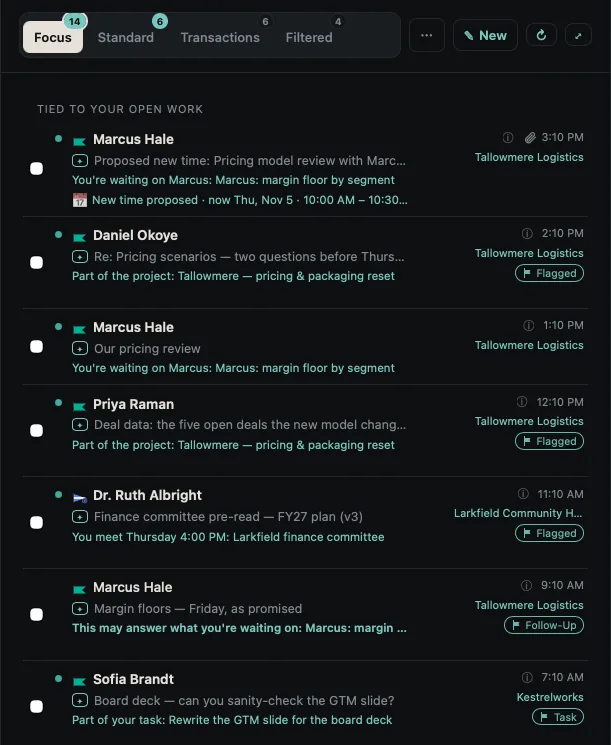
Cognate's mail triage showing the four lanes — Focus, Standard, Transactions and Filtered — with a line beneath one subject explaining why that message is in Focus.
The four lanes, and the line that says why. The lanes are the easy part.

The small things that matter daily

Replies go out from the address the message came to. Mail sent to any of your connected addresses counts as written to you, without listing them by hand. A sender or a whole domain can be moved between lanes in one gesture, both directions. Deletes and archives reach the server, so your phone's mail app agrees with Cognate.

05 · Calendar and events

Every calendar you have, and the time between them.

The calendar problem is not that you need another calendar. It is that you have four, none of them can truly see the others, and the one your colleagues book into is the one that knows least about your life.

Holds

Book something on one calendar and Cognate writes a hold onto every other, so the client scheduling you cannot see your daughter's recital but can see that the time is taken. As things change, everything updates by itself. One device keeps the holds current — your Mac if you have one, and otherwise your iPhone or iPad, so this works for someone with no Mac at all.

Offering times, and booking the one they pick

Reply to someone who wants to meet and Cognate fills in the sheet from the thread itself: how long, which days, mornings or afternoons, their time zone. The times are picked by the app, not by a model. They use every calendar you have switched on, stay inside your working hours, and cluster next to existing meetings so your clear blocks stay clear — all within whatever parameters you set. If a day offered nothing, Why not Thursday? tells you what filled it.

Where their time zone differs from yours it keeps to their working day. Where your hours do not overlap at all it offers their early evening, then their early morning, and says which it is doing. Never their night, never their weekend.

Then the offered times are held. When they reply in their own words — "Tuesday at 10 works" — Cognate reads it against what was held and shows Dana picked Tue, Oct 6 · 10:00 AM with a Book it button. If none of them work, it offers new ones.

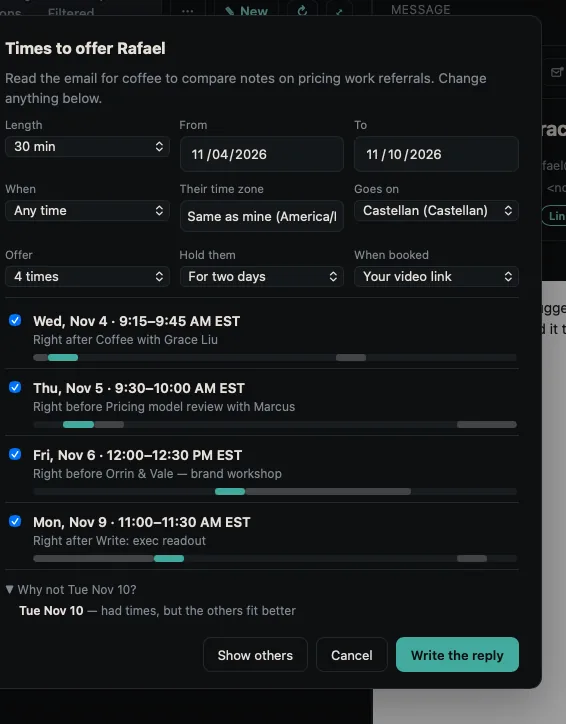
Cognate's Times sheet for a thirty-minute meeting: four offered slots, each with the meeting it sits next to, and a line reading Why not Tue Nov 10 — it had times, but the others fit better.
Filled in from the thread, picked by the app rather than a model, each slot saying what it sits next to — and, at the foot, why a day you might have expected is not on the list.

Travel time

A meeting somewhere you physically go can carry travel either side of it, up to two hours. It draws as striped bands joined to the meeting, it counts as busy when times are offered, and it writes onto the calendar so nobody books the hour you will spend on a train.

Events behave

An event opens as its own page, with its notes, links, files and guests on it, rather than as a popover. One made in Cognate always lands on a real calendar. When an invitation arrives for something you had already created yourself, the page asks is it this event?, and saying yes keeps your notes and files while taking their organizer and guest list. It never merges without asking. A video call gets your own link, or a fresh Google Meet or Teams meeting made by the calendar that owns the event.

06 · The Library

A filing system that keeps itself.

Most tools put written pages in one place and documents — PDFs, Office files, scans — in another, and make you maintain a tree in both. The Library holds them together, and a folder here holds more than files.

A folder holds whatever you would put in one

Not only documents and written pages. A task, a project, a person can sit on the same shelf, because underneath they are all the same kind of thing. And one thing can sit on several shelves without copies existing — a contract under the client, under the year, and under "needs renewing" at once. Nest them as deep as you like.

What goes in is your choice, the way a physical folder is your choice. A folder is for the handful of things you would actually pull out together. It is not where you go to see everything about a client — for that you open the client, and the record has already gathered it.

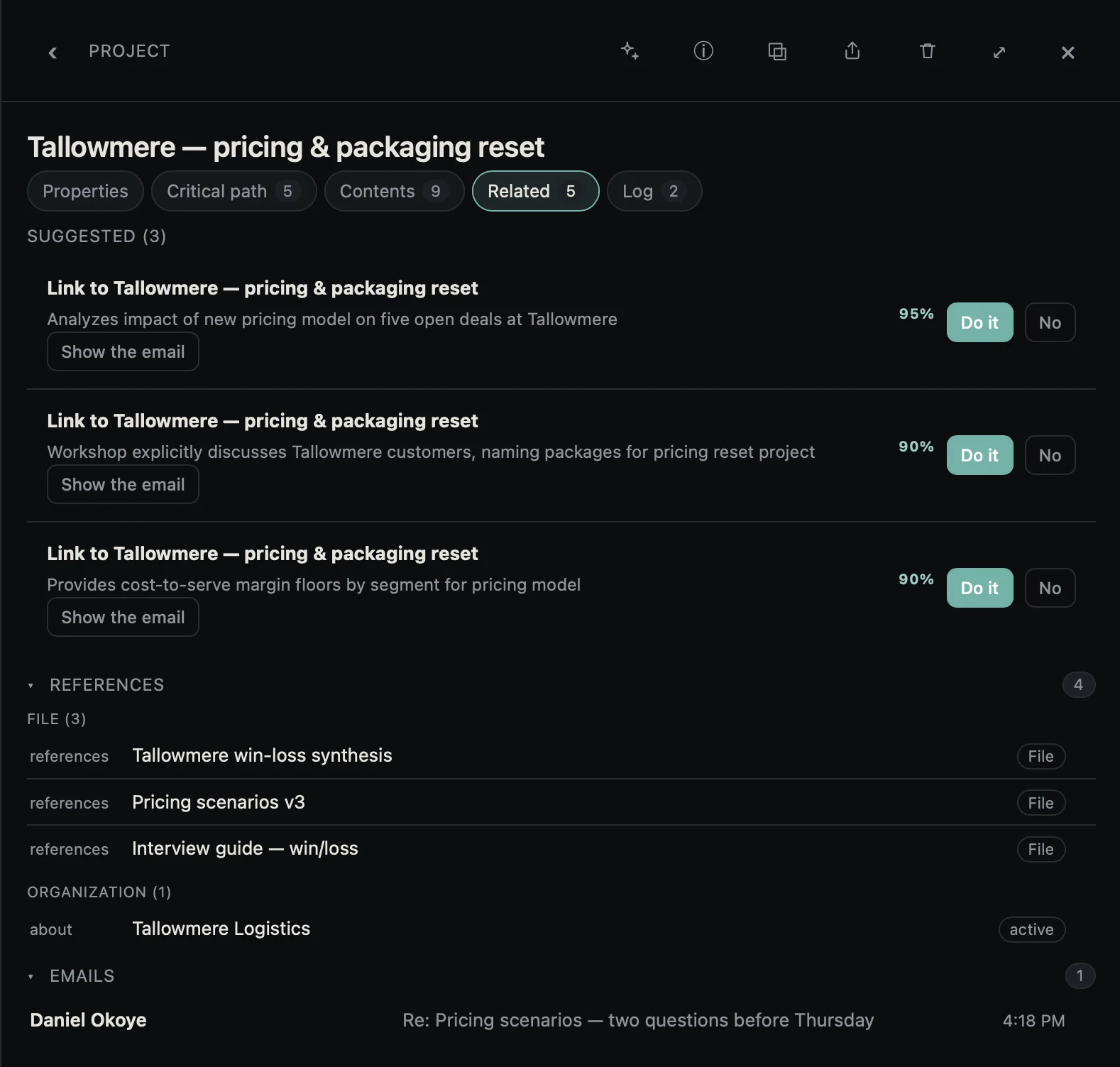
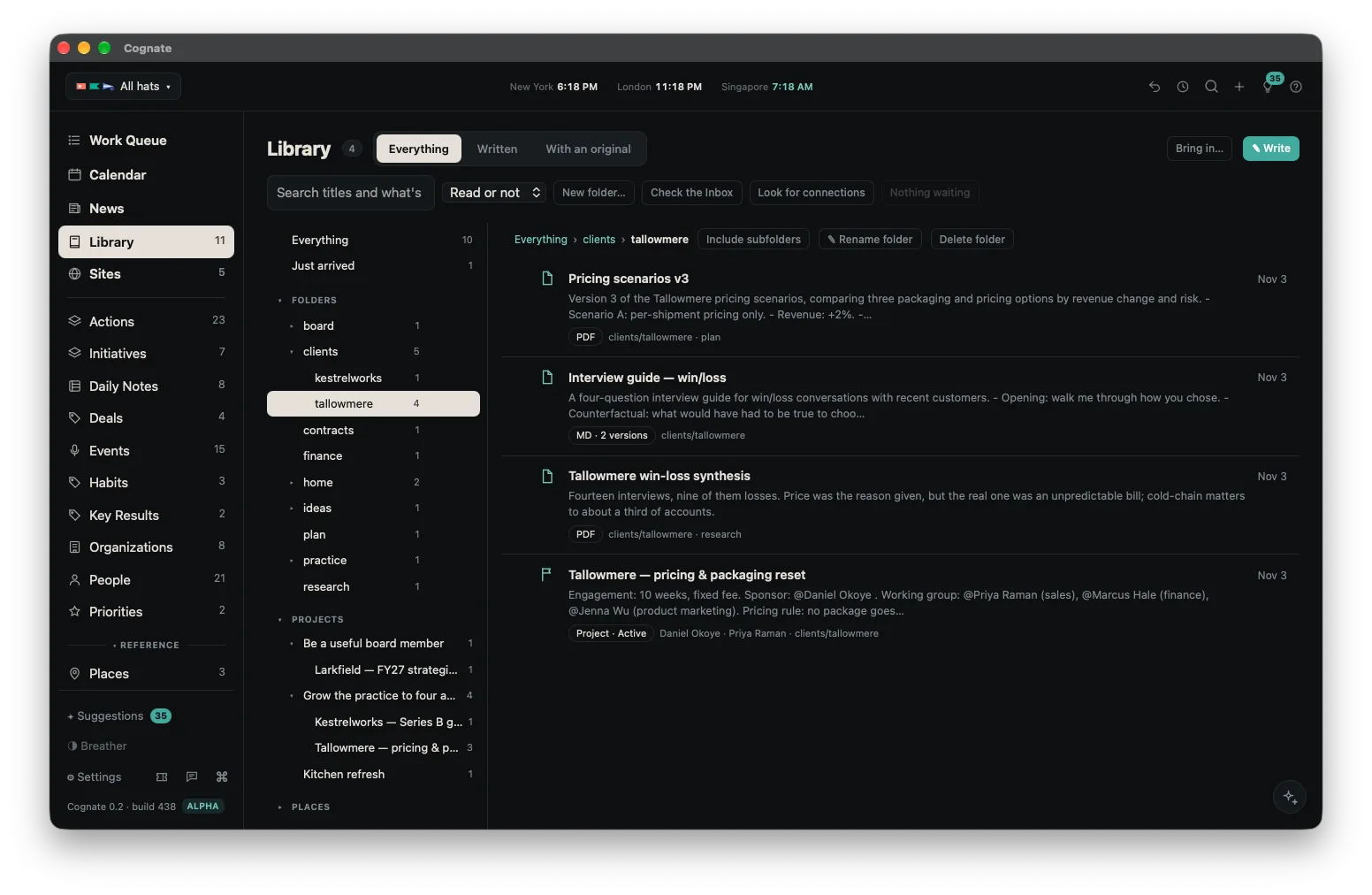
A folder in Cognate's Library holding two PDFs, a written interview guide and a live project on the same shelf, the project carrying its sponsor, its working group and a pricing rule.
Two documents, a written page and a live project on one shelf — four things you would genuinely pull out together. Underneath, they are the same kind of thing.

Folders that move like data

Rename any part of a path and everything beneath it moves with it. Rename onto a name that already exists and the two merge. A folder chip on a record, an inline hashtag, or a folder in search all open the Library at that folder. This is the part that usually rots in other tools, and it is the part we spent the most time on.

Documents arrive already read

A file that lands gets its text extracted, a title, folders and suggested links, straight away. Scans are read too, so a photographed page is searchable inside. One that arrives with suggestions opens so you can deal with them there and then rather than later, which is to say never.

A note full of pictures is a board

Any note holding pictures, link cards or files opens as Board as well as Notes: the same note, laid out as tiles, each card carrying its page’s own picture and its price where the page states one. A shopping list, a mood board, a set of ideas. You still write in Notes; Board is only how you look at it.

They are still just files

Documents live in an ordinary folder you can open, copy and back up without Cognate running. Every note keeps its history, stamped with the time, so you can answer "what was this called before I renamed it?"

07 · People

A CRM nobody has to maintain.

Every personal CRM dies the same death: it goes stale, you stop trusting it, and then you stop opening it. Cognate's answer is not better reminders to update it. It is that the record assembles itself from traffic you were already generating — and that it is honest with you about which parts of itself are old.

It tells you how stale it is

A record carries where each detail came from and how recently it was confirmed. A title and a phone number taken from a signature in a thread you traded last week is worth more than the same fields typed in three years ago, and the record says so rather than presenting both with equal confidence.

In step with Apple Contacts, both directions

Names, addresses and phone numbers go both ways with their labels intact. Where Cognate and Contacts disagree, you choose which wins rather than one silently overwriting the other. A number found in an email signature joins the list and never displaces the primary one.

LinkedIn, without the scraping

Open someone's profile from their record and a Use this profile button appears over the page. Press it and Ari shows you what has changed — a new title, a new company, a personal address from their Contact info — with a tick box on each, and applying leaves a line in their log saying where it came from. Cognate never fetches or reads LinkedIn by itself. It reads the page you opened, at the moment you press the button, and not otherwise. Messages that arrive as LinkedIn notifications land on that person's record too, so a conversation you had over there still counts as being in touch.

What a follow-up really is

Assigning a follow-up to a person does not notify them — there is nobody to notify. It is how you see everything one person owes you in a single place before a standing one-to-one, and send the chase in one click. This is the single-player product doing something a multiplayer one cannot: it is your private record of what you are waiting for, and nobody has to adopt it for it to work.

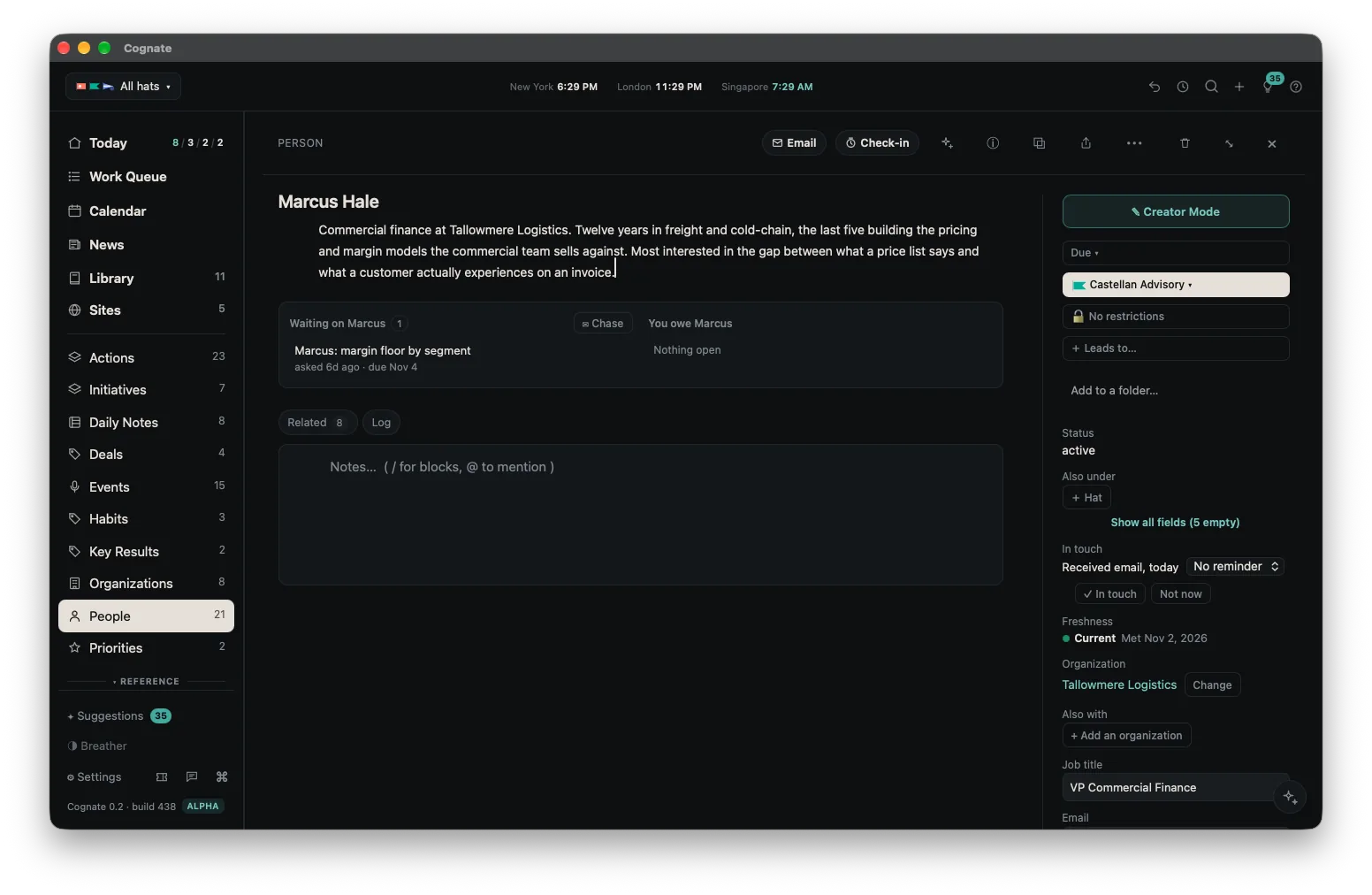
A Person record in Cognate: what they owe you and what you owe them, a labeled list of phone numbers, a LinkedIn link, a description, and an indication of how recently each detail was confirmed.
What they owe you, what you owe them — and how old each part of the record is.

08 · Plans

Dates that move when the work moves.

Priorities sit at the top — what matters this quarter, held as a real thing rather than a note. Beneath them, Projects for work with an end, Situations for things you are managing rather than finishing, and Areas for what simply continues. Your picture of the work, however much or little of it you control.

Forecast dates

Planned dates on a real project slip, and then you spend your Sunday dragging them. So most dates in Cognate are worked out rather than typed: from the order of the plan, the dependencies, how big each task is, and the pace you have actually been keeping. Only the genuinely fixed dates are set by hand, and they act as pins the forecast works around.

It notices what you are actually doing

A task you have touched in the last three days, whether that is its notes, its status, its log, or time you tracked against it, is planned from today, ahead of the rest of the queue, and marked in progress. It lets go by itself when you stop.

Runway to a gate

A gate shows how many unfinished items stand between you and it, how many working days are left, and how fast you have been closing work — measured from what you completed, not from what you estimated. With fewer than four finished items it declines to guess a rate, which we think is the honest answer.

A queue that parks things

Tasks surface on their due date. Everything else, whether a project, a person or a note, surfaces on a check-in date you choose, and until then it is parked: out of the queue, not nagging, not forgotten. Four sections: what is due, what is coming, what you have planned, and the undated backlog in priority order.

Time, if you want it

Off unless you turn it on. Then a timer on any item, one at a time, that follows you between devices and survives closing the app. Tracked and billable cascade down from a client or a project to everything beneath. Reports and CSV out.

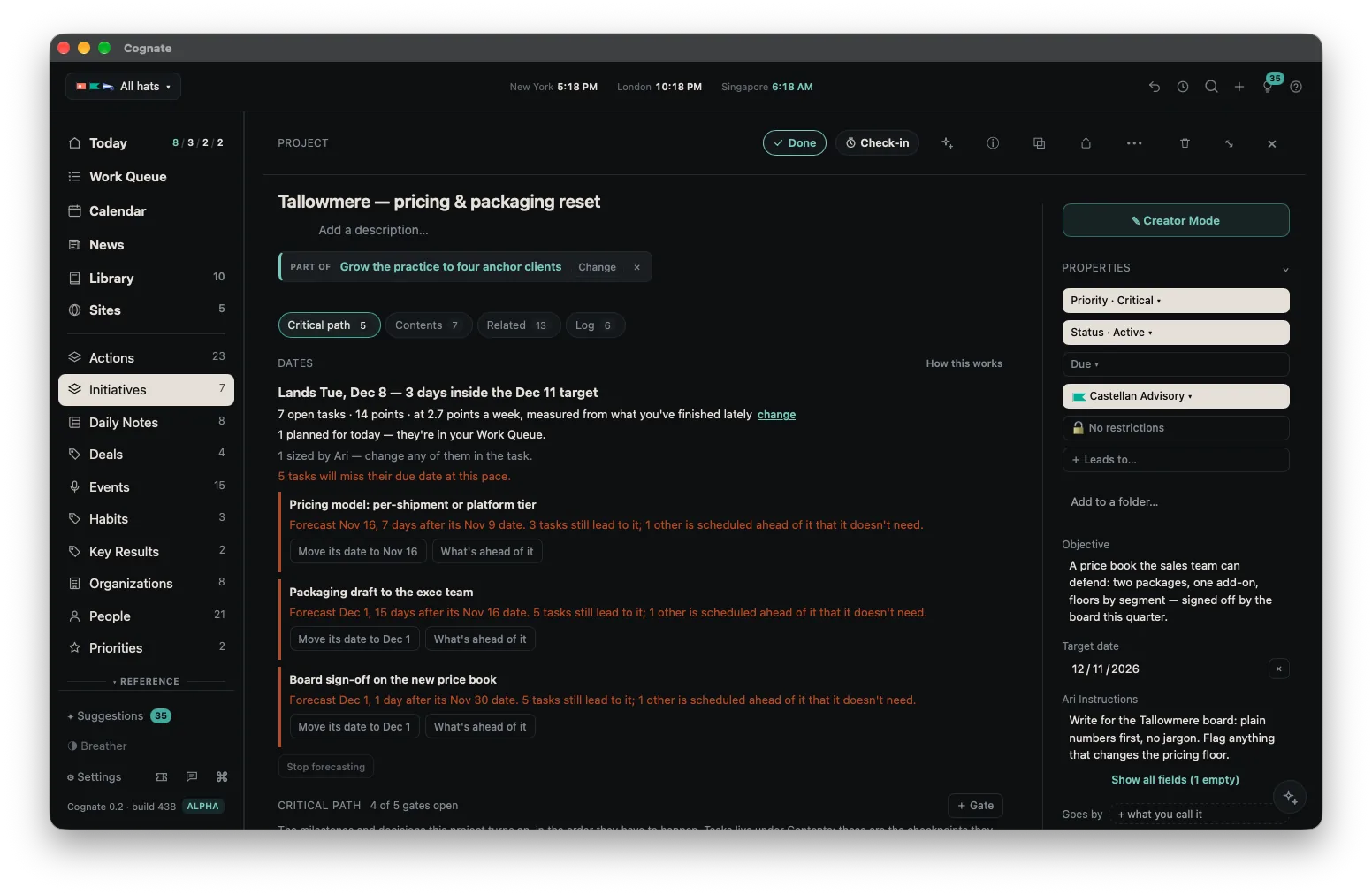
A project in Cognate showing a forecast date — Lands Tue, Dec 8, three days inside the Dec 11 target — worked out from seven open tasks, fourteen points, and a pace of 2.7 points a week measured from work already finished.
Dates worked out from the order of the plan and the pace you have actually been keeping.

09 · Places and Sites

Two small things that turn out to matter.

Three years from now, someone asks you for the name of that restaurant in Barcelona — the one with the vermouth, where you ended up talking to the owner for an hour.

You open Places. It is there, with its address, its hours, the kind of place it is and a map, none of which you typed. Under it: the journal line you wrote that night, the two other times you went, and the dinner you held there with a client eighteen months later, each dated. Last: Aug 30 · 6 days in the past year.

What you actually did, that first night, was write one sentence about dinner.

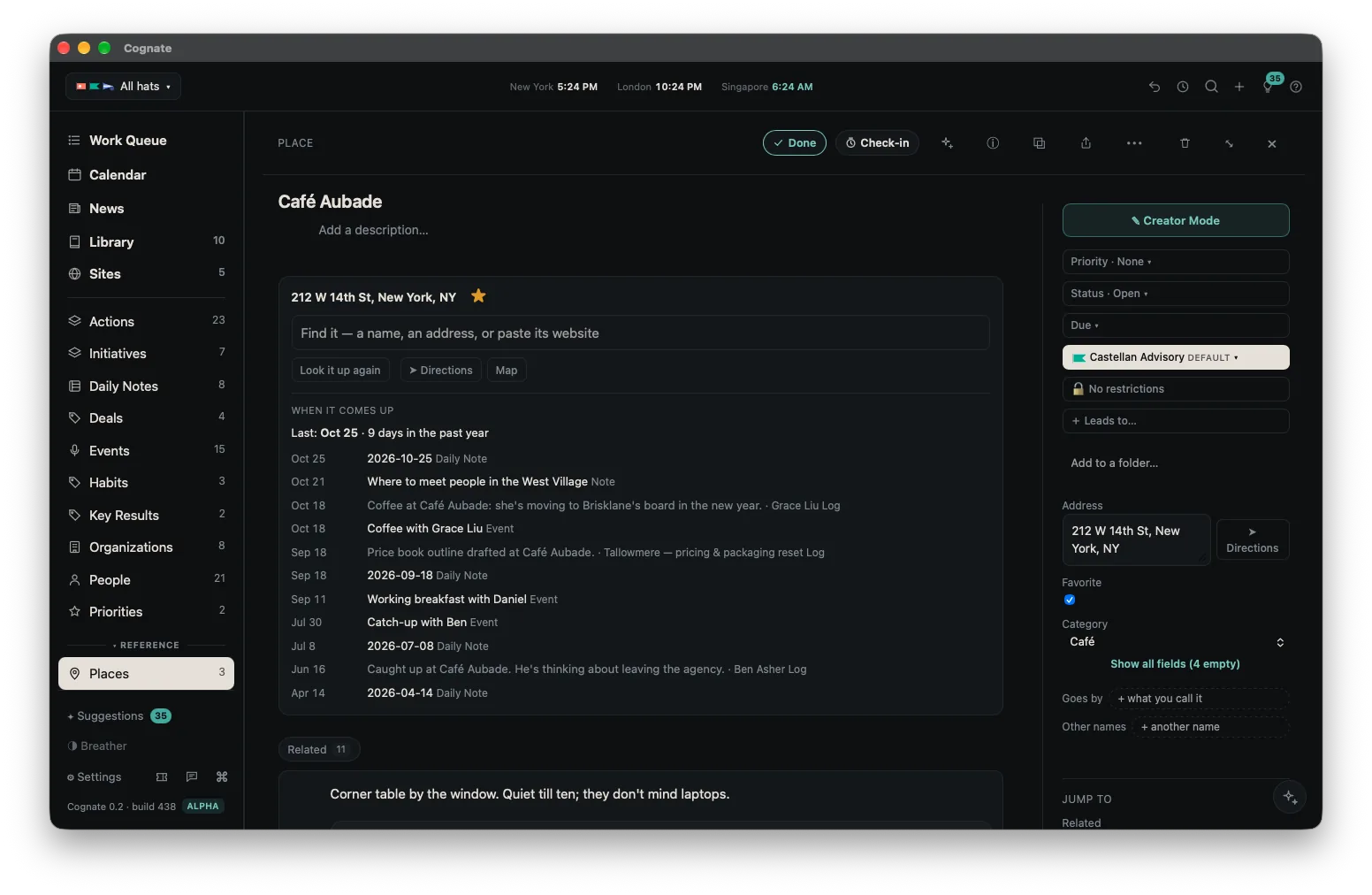
A Place record in Cognate with its address, hours, kind and map, and beneath it every time it has come up — journal lines, notes and events held there, each dated.
A Place, and every time it has come up. None of the detail at the top was typed.

Why this turns out to matter

Because the same mechanism runs everywhere. A page that turns out to be a place becomes a Place. A venue's card photographed at a conference offers one. A meeting location you pick from the lookup becomes one, and the meeting then shows on its page. You end up with a map of where your life actually happened, assembled from things you were doing anyway.

Sites

The websites and web apps you actually keep, as tiles wearing their own icons, grouped how you like. Any address anywhere in Cognate offers to become one. It sounds slight until you realize it means the browser, the Library and your records share one idea of what a web page is.

Only blanks are ever filled, a Place you already have is used instead of a new one, and the whole behavior has a switch.

10 · Reading

A reader that knows which hat cares.

Topics you follow and feeds you add, scored against what each hat actually cares about and learning from what you keep. One row per story, however many outlets carry it.

The same story, told four ways

Cognate gathers them rather than showing you the same news five times with five headlines. A story that matters to the hat gets a score and a line saying why; a baseline runs as stories arrive, and a fuller pass re-scores against your topics, your profile and your open work.

Newsletters out of the inbox

Substack, Beehiiv and Ghost can land in News instead of your mail, in full, one at a time, your call — and Unsubscribe sits right beside who it is from. A newsletter's stories inherit the hat of the email that carried them.

Reading properly

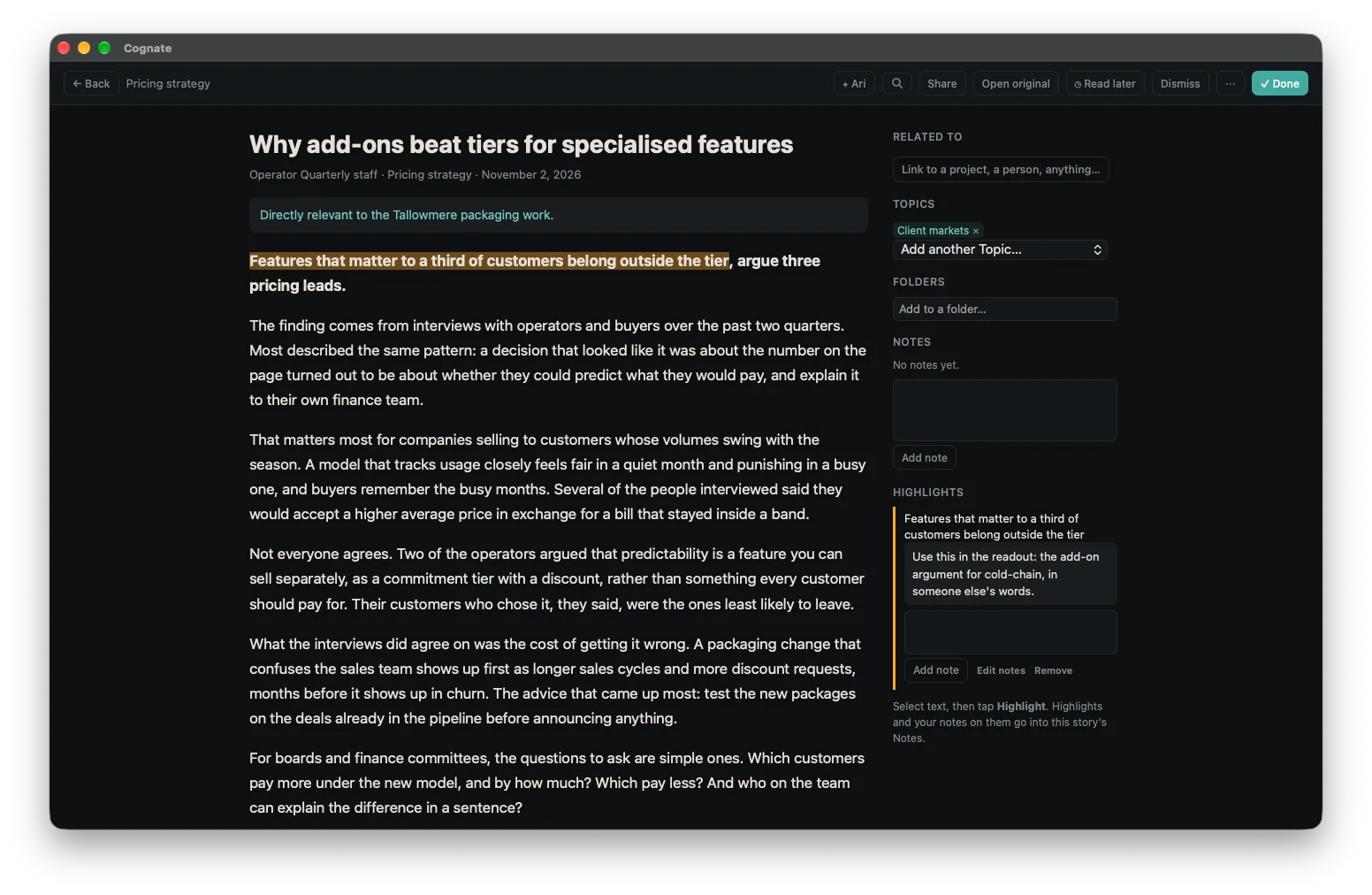
Highlights painted onto the article, a note on any of them, and a queue for later that a link from anywhere can join — including a page you found somewhere else entirely, or one Ari put there for you.

An article open in Cognate's reader with a highlight painted onto the text, a note attached to it, and the story's topics listed beside it.
A highlight on the article, a note on the highlight, and the topics it was scored against.

11 · The browser

Because most of your context is not in your email.

On the face of it, a browser is the last thing a product like this needed. The reason it is here is that it is not really a browser: it is another way into the same record. What you read, highlight, keep or fill in from it lands in the same graph as your mail. Once that is true, reading the web inside Cognate stops being a convenience and starts being the point.

Capture where you are

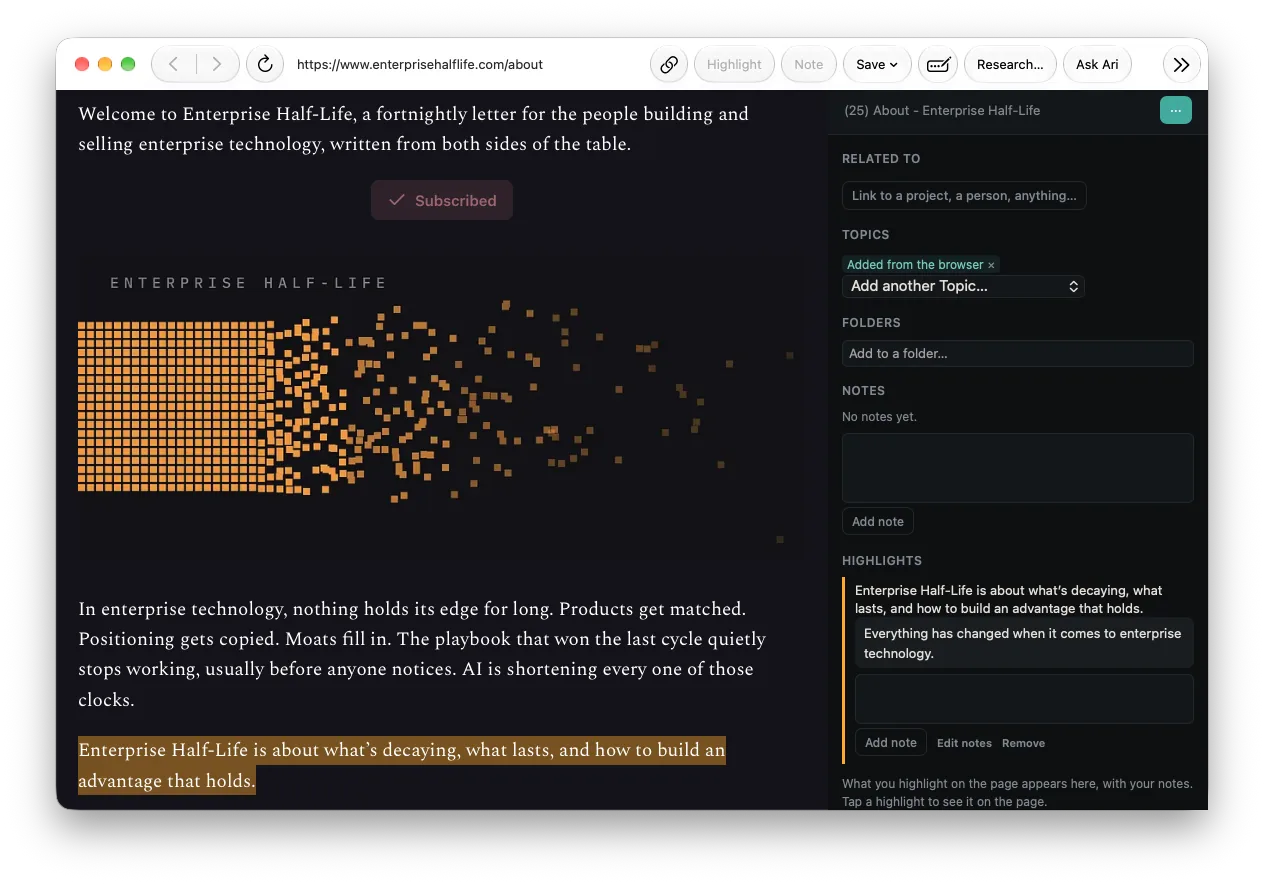
Select something and keep it. Save the page as a card, as a PDF into the Library, or into the read-later queue. Highlights are painted on the page and stay there. A quote taken from an article's own page becomes a highlight on that article, not an orphan note.

Ask about what you are looking at

Ari opens in a panel beside the page on a Mac, as a sheet on a phone, and answers about it — with everything else she knows still in view. The conversation is an ordinary one, in her list with all the others, so you can pick it up later.

Forms, from your own record

Your details, from the record you already keep, with an address treated as one thing even when the form breaks it into five boxes, and a choice offered when you have more than one email, phone or address.

Cognate's browser on a Mac with an article open, a highlight painted on the page, a note on it, and Ari's panel beside it.
The panel beside the page — with everything else she knows still in view.

Its sign-ins are kept apart from the rest of Cognate. It has no tabs and keeps no passwords — it uses your device's own. On a Mac it can be your default browser.

12 · Ari

An assistant that starts from the situation.

Everything above exists so that this part can work. An assistant is only as good as what it already knows, and the reason Ari can answer "where are we on this, and what is blocking it" is that thirteen other threads have been quietly building the answer. What follows is what she can actually do — not what an assistant might one day do.

What she can actually change

Create and restructure work, set a priority, snooze or wake an item, move an existing record under a new parent, build dependencies, size and forecast a plan, put a real meeting on a real calendar with a video link, rewrite a named section of a note rather than appending a second copy, and change the signature Cognate puts on your mail. She reads an open email and the files attached to it.

She asks before she acts, every time

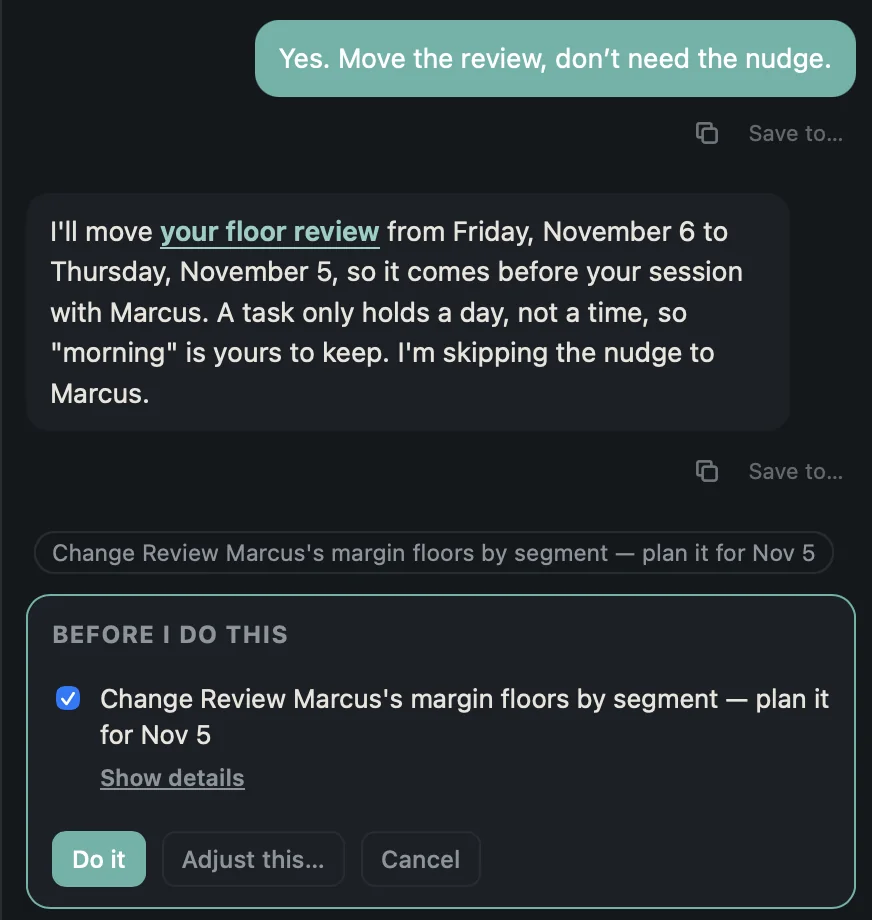
Every change arrives under a heading that says Before I do this, with a checkbox and the option to skip. Afterwards it can all be undone in one gesture: changed items go back as they were, what she made goes to Recently deleted, what she deleted comes back. You can also just tell her to undo it.

Ari restating the one change she is about to make — moving a floor review from Friday to Thursday so it comes before a meeting — above a card headed Before I do this with a ticked checkbox, a Show details link, and the buttons Do it, Adjust this and Cancel.
She says what she is about to do, and why, before the buttons.

Provenance

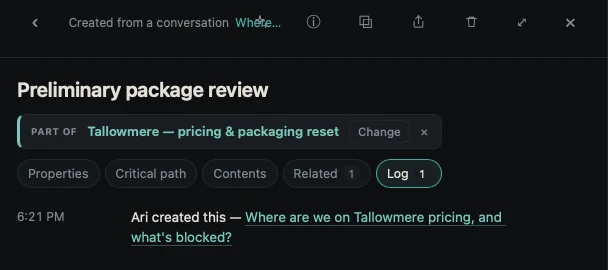
A record she made says so: Ari created this, linked back to the conversation that produced it. Months later you can still find out why something exists.

A record in Cognate carrying the line Ari created this, linked back to the conversation that produced it.
Ari created this — and the conversation is one click away.

She sees across hats

Not confined to the one you are standing in, because the Thursday where three collide is exactly when you need her. The only limit is your privacy settings: anything marked Keep from AI is never sent, by any feature.

What it costs, and where it goes

Cognate picks the model for the job rather than running everything on the most expensive one — a closed question gets a light model at a fraction of the cost, while anything needing judgment does not. Every request is counted by feature and by model, and Settings shows you where your AI spend actually went.

13 · Yours, and quiet

The most personal things you own stay on the machine you own.

Local-first is a real architectural choice with real costs, and we would rather be straight about both. Your content never reaches us, which means we cannot lose it, cannot be compelled to hand it over, and cannot read it to improve anything. It also means we cannot restore it for you when something goes wrong — so most of what follows is about making sure you can.

Two switches, because the two fears are different

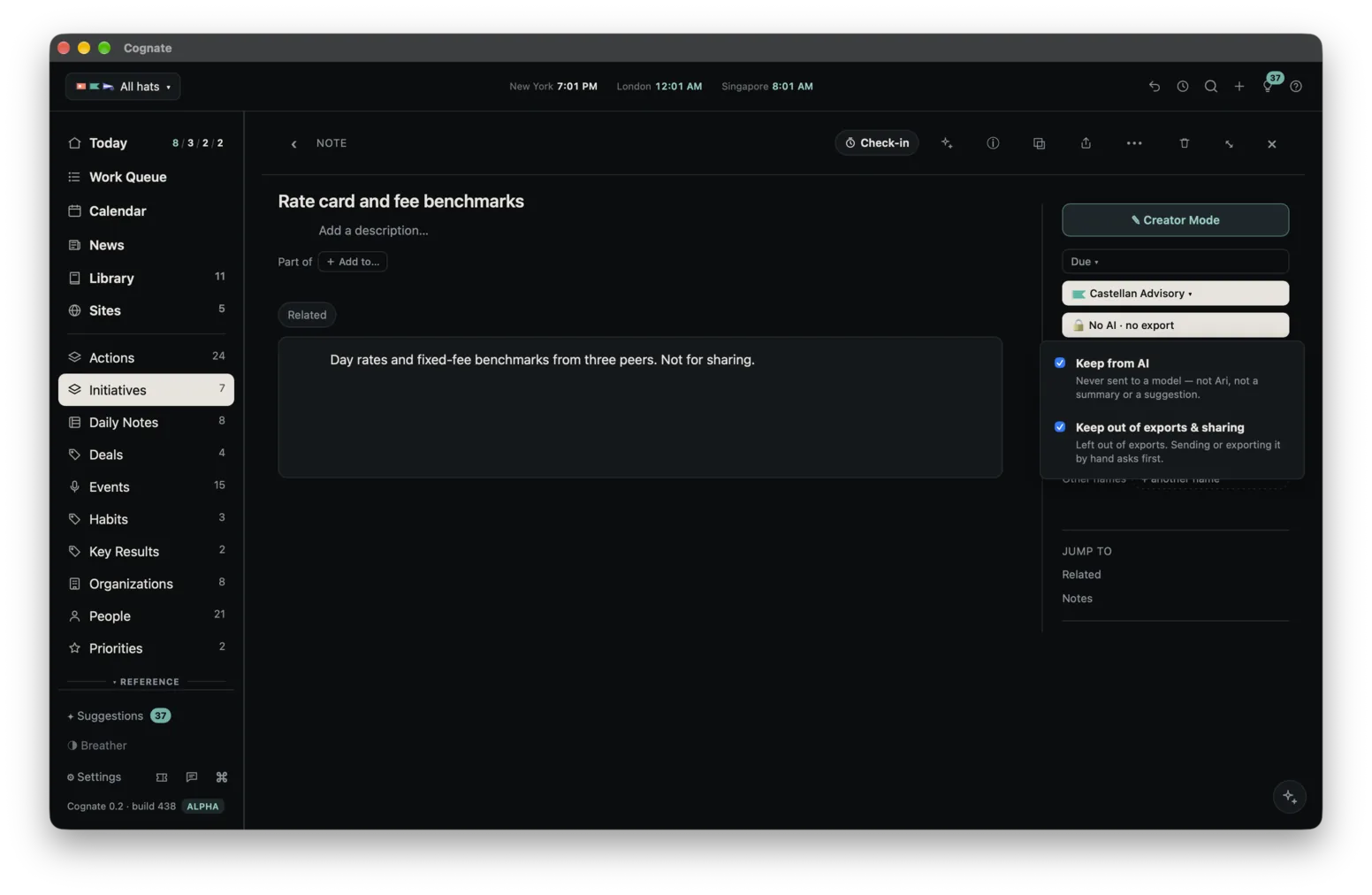
Keep from AI is a hard rule: nothing marked with it is ever sent to a model. Keep out of exports and sharing is a warning: a bulk export leaves it out unless you include it, and sending one by hand asks first. Set either on a hat, on a type, or on a single item. The strictest setting wins, and every item tells you which rule is in force.

An item in Cognate showing the two privacy switches — Keep from AI, and Keep out of exports and sharing — with a line stating which rule is in force on it.
Two switches, and an item saying which rule is in force on it.

Getting your data out

Export everything, in open formats, from the first day — without signing in to anything. Files export with their documents. If you leave, the fabric leaves with you.

Getting it back

We cannot see your data, so we cannot restore it for you. Instead Cognate keeps what you need to restore it yourself: Undo, Recently deleted, a note's history, and daily snapshots. Repairs can be undone, and nothing runs against your machine from our end.

When you report a problem

What we receive has none of your writing in it, and you read it before it goes.

14 · The smaller things

The rest of a day.

None of what follows is a reason to move your working life into Cognate. Each one is a small app you were paying for, or meaning to, and now do not have to.

Habits

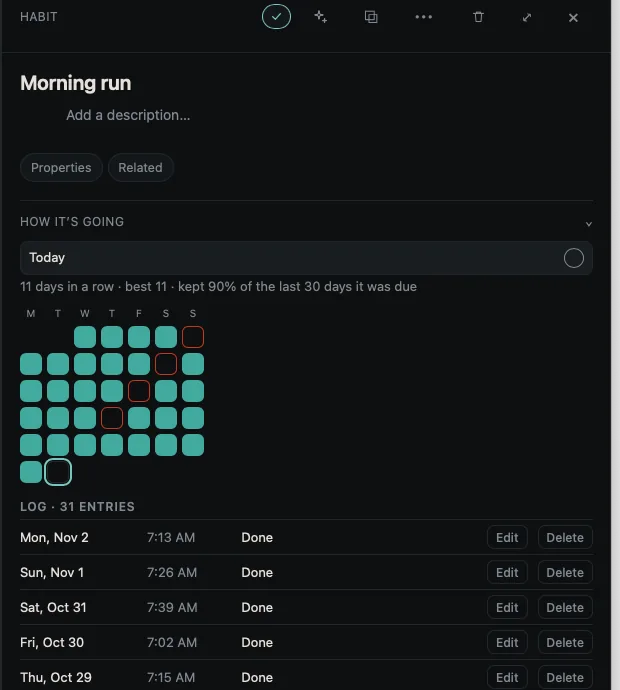
Something you do daily, or a number you log. A habit shows its streak, its best run, how often you keep it, five weeks of days you can fill in behind you, and for a number a ninety-day chart against its goal. Due every day, on weekdays or at weekends; paused when life says so. One quiet nudge in the evening if it is still undone, taken back the moment you do it on any device. Ari can read them and log one for you.

From an iPhone or iPad, a habit can write itself into Apple Health — weight, water, exercise minutes, meditation minutes. It only ever writes. Nothing is read back out of Health, and nothing from Health reaches us.

A habit's page in Cognate showing eleven days in a row, a best run of eleven, ninety per cent kept over the last thirty days it was due, five weeks of days behind it, and a log of thirty-one entries.
The streak, the best run, five weeks of days behind it, and every entry. A number logs the same way and draws a ninety-day chart against its goal.

Daily Analytics

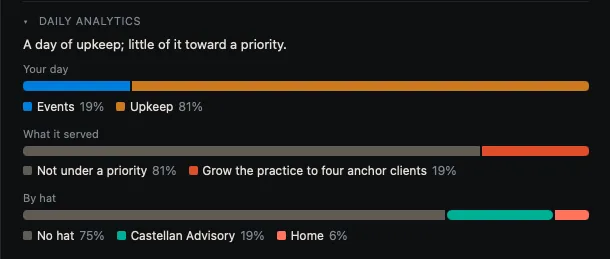
Above the day’s log, a line on what kind of day it was and three thin bars: your day, what it served, and by hat. Shares, never hours — read from what the day actually holds, with tracked time standing in wherever you tracked any. Press a part of a bar and the log below shows exactly what was counted, and you can tell it that something counts as something else.

Daily Analytics on Cognate's Today view: a line saying what kind of day it was, then three thin bars showing your day, what it served, and the split by hat.
Shares, never hours. Press a part of a bar and the log below shows what was counted.

Why they are here at all

Because the record already knows the day. A habit tracker that cannot see your calendar is guessing, and a board of saved pictures in a separate app is one more place to lose them. These are cheap to build on top of a fabric that exists and expensive to build anywhere else.

15 · What is not here

No surprises.

Everything above is built and running today. Here is what is not, while you are still deciding whether to spend an email address on us. We would rather you heard it here than found it later.

That is the whole of it.

Fourteen threads, and one fabric. If that sounds like the thing you have been assembling by hand for years, we would very much like you to try it.

Request an invitation

Mac, iPhone and iPad only. No Windows or Android yet.

30 days free · founding membership $279 a year, for life · no card to start

This page describes Cognate as it is built today and is updated as it changes. Cognate runs on macOS 14 or later, and on iPhone and iPad with iOS or iPadOS 17 or later. AI runs on Anthropic's Claude models.